How do you tell whether a dropshipping integration will streamline your store or flood your inbox with support tickets? Connecting a new supplier or app to your e-commerce platform sounds easy in theory, but bad integrations can quietly wreck your business. A poor connection leads to out-of-stock orders, wrong tracking numbers, broken inventory syncs, and hours spent manually fixing data errors. The right integration should work silently in the background—matching your specific sales channel, pushing accurate order data, flagging sync failures instantly, and scaling smoothly as your daily order volume grows. o
Define Your Dropship Integration Needs
A useful dropship integration solves a named operational problem. Start with your sales channel and fulfillment process, then list the data that must move between them. A new store may only need product import, order transfer, and tracking updates. A multi-store operation may also need variant mapping, warehouse selection, permissions, and a clear exception queue.
Write down the required workflow in order:
- A product and its variants enter the store.
- A buyer places an order.
- The correct SKU, quantity, address, and shipping option reach fulfillment.
- The order receives a fulfillment status and tracking number.
- The store and buyer receive accurate updates.
- A person can find and correct any failed handoff.
This list prevents a common mistake: choosing a connection because it advertises “automation” without checking the fields your store actually uses. If you are still separating automated tasks from decisions that need human review, read USAdrop’s guide to automated dropshipping workflows.
Separate required features from optional features
Mark each feature as required, useful, or unnecessary. Required features should reflect your current operation, not a store you may build later. Extra connectors and dashboards can add fees and failure points without fixing today’s bottleneck.
| Store need | Required integration behavior | Test evidence |
| Product setup | Correct title, images, variants, SKUs, and options | One imported product matches the source record |
| Order transfer | Correct buyer, address, SKU, quantity, and shipping data | Test order appears once with complete fields |
| Tracking | Valid carrier and tracking data return to the store | Test order shows the expected status and tracking |
| Exceptions | Failed or incomplete records are visible | Deliberate test error creates an actionable alert |
| Access control | Only necessary permissions are granted | Permission list matches the documented purpose |
Match Dropship Integrations to Your Platform
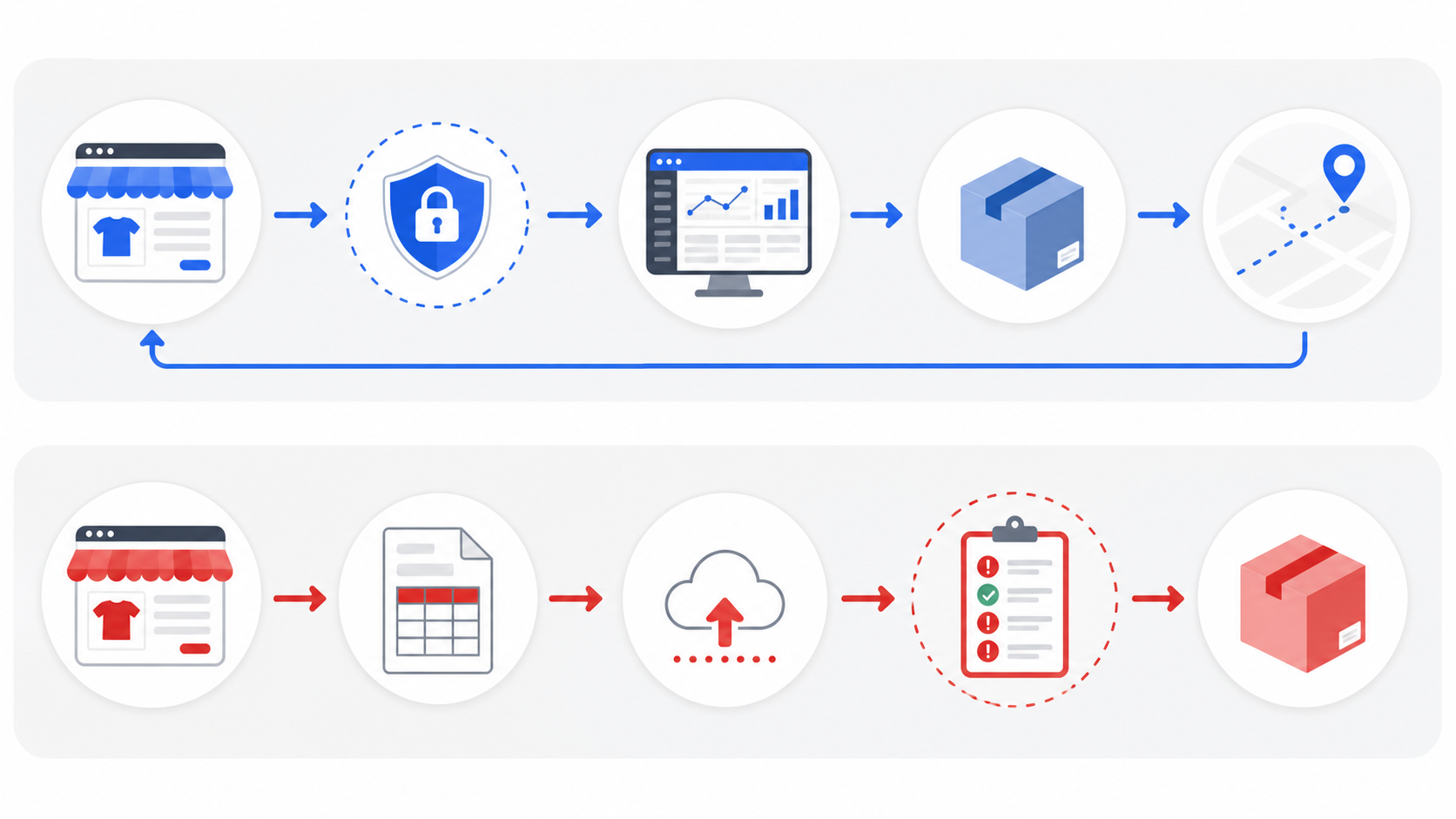
Platform compatibility is the first pass-or-fail check. A connector built for Shopify does not automatically support WooCommerce, and a CSV order upload is not the same as a direct connection. Verify support on the provider’s current first-party documentation before planning your workflow.
For USAdrop, the current store integration FAQ says Shopify and TikTok Shop are the directly connected channels. It also says non-Shopify or offline orders can be uploaded with a CSV template. That distinction matters: a direct connection can reduce recurring data entry, while a CSV workflow requires file preparation, upload checks, and manual exception handling.
Check account and store limits
Ask whether one account can connect multiple stores and whether a single store can connect to multiple fulfillment accounts. USAdrop states that one USAdrop account can bind multiple Shopify stores, but each Shopify account may connect to only one USAdrop account. Confirm account ownership and remove old connections before a migration.
Confirm the exact channel workflow
Shopify sellers can review the product-import process for Shopify before testing a connection. TikTok sellers should use USAdrop’s TikTok Shop fulfillment page to verify the supported workflow and then confirm the exact market, warehouse, SKU, carrier, and shipping mode for their shop.
Audit Dropship Integration Data
Store compatibility only tells you that a connection exists. It does not tell you which objects, fields, or update directions it supports. Build a small data map before setup so you can spot gaps before customers do.
Check these records:
- Product and variant identifiers
- SKU and option names
- Sellable stock location
- Customer name, phone, and address
- Shipping method
- Order status
- Carrier and tracking number
- Cancellation, refund, and reshipment status
For every field, record the source of truth, destination, update direction, and owner when the values disagree. Inventory may come from a warehouse, while product copy remains controlled in the storefront. A tracking number may return from fulfillment, while the seller still owns the customer message.
Protect customer and store data
Review the permissions requested during connection. A dropship integration should receive the minimum access needed for its documented job. Confirm who can connect or disconnect a store, how team access is removed, and what happens to historical records after disconnection. Save the setup date, account owner, and approved permissions in an internal access log.
Test Dropship Integrations Before Launch
A controlled test should prove the complete cycle, not only show a “connected” badge. Use one low-risk product with several variants and place test orders that expose common mapping problems.
Run at least these cases:
- A normal order with one item.
- Two variants of the same product.
- An address containing an apartment number or special character.
- A cancellation before fulfillment begins.
- A tracking update after shipment.
- A deliberately invalid SKU or incomplete field.
Compare the storefront, integration dashboard, and fulfillment record after each step. Check for duplicate orders, swapped variants, truncated addresses, missing phone numbers, incorrect shipping methods, delayed statuses, and tracking that never returns.
Set a clear acceptance threshold
Do not judge a test only by whether an order ships. Decide what must be correct before launch: no duplicate orders, exact SKU and quantity, complete delivery data, correct tracking, and a visible error when a record fails. Pause the rollout until every required field has passed.
Compare Dropship Integration Costs
The cheapest connector is not always the lowest-cost workflow. Compare subscription fees with the labor and risk created by manual work, add-ons, order limits, and failed updates.
Include:
- Monthly or annual platform fee
- Per-order or transaction fee
- Charges for additional stores or users
- Limits on products, orders, or imports
- Paid support or onboarding
- Staff time for CSV preparation and reconciliation
- Refund, reshipment, and support costs caused by errors
A CSV workflow can be reasonable for occasional orders from an unsupported channel. At higher volume, repeated file preparation and correction may cost more than a supported direct connection. The better choice depends on order frequency, data complexity, and the cost of an error, not only the listed software price.
Plan Dropship Integration Exceptions
Even a tested integration can encounter a changed SKU, unavailable variant, malformed address, delayed tracking event, expired authorization, or temporary service interruption. Choose a workflow that makes these failures visible and gives someone a clear next action.
Create an exception list with an owner, response time, and fallback for each failure type. For example, an unavailable variant may pause the order for customer contact, while a missing tracking update may require checking the fulfillment record and carrier data. Keep the manual fallback documented rather than improvising during a sales spike.
USAdrop’s fulfillment service overview explains how store connection, order processing, and tracking fit into the broader fulfillment process. The integration is one handoff within that process; it does not remove the need to monitor stock, shipping choices, or customer-facing promises.
Review performance after launch
Track duplicate-order rate, mapping errors, orders awaiting manual correction, time to resolve exceptions, and percentage of shipments with tracking returned correctly. Review these measures by store and channel. A connection that works for low volume may need new controls when products, warehouses, or team members multiply.
Choose Your Dropship Integrations
Choose the option that passes all five gates: confirmed channel support, complete required data, successful end-to-end testing, acceptable total cost, and clear exception ownership. Reject any option that depends on an unconfirmed native connection or leaves failed orders invisible.
Before connecting a live USAdrop account, use this decision checklist:
- Confirm direct support or document the CSV route.
- List the required products, orders, inventory, and tracking fields.
- Review permissions and account ownership.
- Run normal and failure-case test orders.
- Record who handles every exception.
- Recheck cost and performance after the first controlled batch.
When Shopify or TikTok Shop matches your channel and the test passes, you can connect the supported store and build the workflow around the verified fields. If your channel needs CSV upload, set a repeatable preparation and reconciliation process before increasing volume. Visit USAdrop to review the current fulfillment options and confirm your store setup.
Dropship Integrations FAQ
What are dropship integrations?
Dropship integrations connect a sales channel with product, order, fulfillment, and tracking systems. Their exact data coverage varies, so sellers should verify supported fields and test the full order cycle.
Which stores connect to USAdrop?
USAdrop’s current first-party FAQ lists Shopify and TikTok Shop as direct connections. It says other or offline-store orders can use a CSV template for manual upload.
Is CSV a direct integration?
No. CSV upload transfers prepared order data through a file. It requires manual formatting, validation, upload, and exception checks rather than a live store connection.
How should I test an integration?
Use controlled orders covering normal purchases, variants, address details, cancellation, tracking, and an intentional error. Compare every record across the storefront and fulfillment system before launch.
Can integrations prevent every order error?
No. Connections can reduce repeated entry, but mapping, authorization, inventory, address, and tracking failures can still occur. Sellers need monitoring, exception owners, and a manual fallback.